Oracle Engine
A downloadable tool for Windows and Linux
Whenever I sit down to plan or write a story, I have a stack of solo roleplaying rules and a handful of polyhedral dice. The roleplaying rules contain various oracles, lists of words, from which word pairs can be randomly selected. When I want to develop some more information about events, or the way a character acts, I roll on these oracle tables and interpret the word-pairs, for meaning based on the context of the story. I have been stunned by how successful it is.
Sometimes, though, I want to quickly consult an oracle without dragging out the books and dice. With this in mind I created this Godot-based Oracle Engine. It is designed in such a way that you can add your own oracle word lists.
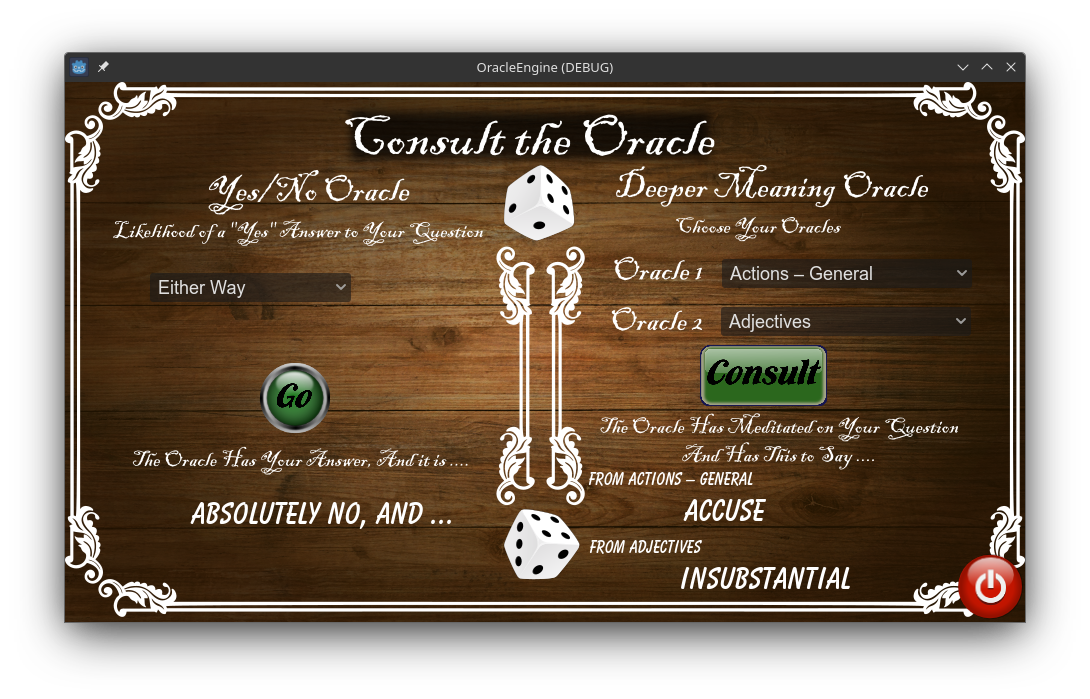
There are two oracles in the tool. On the left is the Yes/No Oracle, and on the right, the Deeper Meaning Oracle.
The Yes/No Oracle
If you frame your question to require a “Yes” or “No” answer, then you can use the Yes/No Oracle. Select the likelihood that your answer will be “Yes” using the drop down, then press the Consult the Oracle button.
The oracle will display its answer which will be one of; “Absolutely Yes, and ...”, all the way down to “Absolutely No, and ...” Here is the list of possible answers and how you interpret them.
Yes, and … | An exceptionally good “yes”. This is a “yes” with an added benefit. |
Yes | The expected result is true. |
Yes, but … | The expected result is true, but there is a minor problem. |
No, but … | The result is the opposite to what is expected, but there is some positive aspect to it. |
No | The result is the opposite to what is expected |
No, and … | The result is that things haven't turned out as expected, and even worse, there is an added sting in the tail. |
Example: I have written a story where the main character is careening down a street in a shopping trolley and there is a sharp bend in the road ahead. On the inside corner there is a steep earth bank rising above the road, and on the other side there is a guard rail, and beyond that a big drop into a swamp. While I could dictate what happens, I like a add a bit of serendipity or disaster into my stories so it doesn’t end up looking contrived. I consult the Yes/No Oracle, with the question in my mind “Does the character make it around the curve safely?” I assign the likelihood of success as Unlikely. I am being kind. I could have selected Very Unlikely or Nearly Impossible. Pressing the button yields the answer “Yes, but...” I interpret that as the character somehow manages to lean the shopping trolley in such a way that they successfully manage to get around the corner but now they’re facing an on-coming car.
The Deeper Meaning Oracle
The Deeper Meaning Oracle can be used to introduce more information about a scene, or a character’s behaviour. Consulting this oracle will yield two words which are interpreted based on the context. Interpret the words based on what you know of your world, your character, and the story. It may be that you can't get any meaning from it, in which case, press the button again.
The oracle pairs are selected using the two drop downs.
Example: While planning the story “Love is in the Air”, I wanted to know why the research station the crew of the Addington were investigating, had been vacated. This was a perfect question for an oracle. In this case I used the Action and Theme oracles from the Starforged science fiction solo roleplaying game rules.
The results were; Action: Falter and Theme: Poverty. In the context it was easy to interpret this as the station had been abandoned because the research funding had dried up. This meant that the station had also been stripped of valuable or easily portable equipment by the research organisation.
Adding Your Own Oracles
You will not need to touch the coding if you want to add extra oracles.
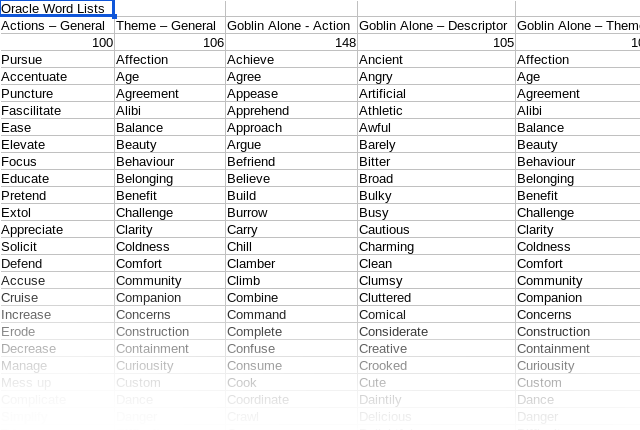
Open the Oracle_Word_Listsv0.csv in your favourite spreadsheet editor and add your new word lists as a new column. Give it a title, and include the numbe of elements in your list at the top in row 3.
This edition includes the oracles I created for “A Goblin Alone,” the solo rules for the Goblin Errands Game Jam.
Download the Godot Oracle Engine
Unzip them where-ever you like. In the zips you will find an executable binary file, a .pck file and a directory called lists which contains the oracle word lists file. To run the executable, you may need to make it executable. I haven’t tested it on a Windows machine.
Obviously, the Windows version contains a couple of .exe files instead of the .x86_64 file.
The Godot Oracle Engine and Oracle Word Lists are released as donation-ware (which most people interpret as free) but are copyright ©Hamish Trolove 2025. No guarantees, As is, where is, and all that sort of stuff.
That’s about it. Have fun using this.
You can find out more about this project on my website: https://www.techmonkeybusiness.com/articles/Oracle_Engine_in_Godot.html
Download
Click download now to get access to the following files: